Office Ergonomic Furniture Insights: Learning About Ergonomic Workplace Setup
Office ergonomic furniture refers to workplace furniture designed around human posture, movement, reach, and everyday working habits.
The concept comes from ergonomics, a field that studies how people interact with tools, equipment, and physical environments. In an office, ergonomics is applied to chairs, desks, monitor positions, keyboards, lighting arrangements, and other parts of a workstation.
An ergonomic office chair is one of the most familiar examples. It may include adjustable seat height, back support, armrests, and other features that allow the user to create a more suitable sitting position. The purpose is not to force every person into one posture, but to provide enough adjustment for different body sizes, working styles, and desk arrangements.
An office desk and chair should also be considered as a connected setup. A chair that fits well may still create difficulty if the desk is too high or too low. Similarly, a suitable desk can become less useful when the monitor, keyboard, or chair position creates awkward reaching or viewing angles.
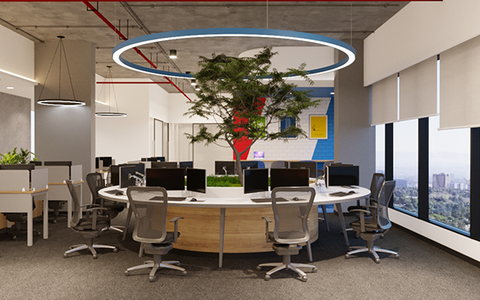
Modern office furniture has also expanded beyond traditional desks and fixed seating. Adjustable desks, modular workstations, monitor stands, collaborative tables, and flexible storage can be arranged for different activities. Custom office furniture takes this idea further by adapting dimensions, layouts, or features to a particular workplace environment.
Financial planning can also influence workplace furniture decisions. Office furniture financing is a term used for arrangements that spread payments for qualifying furniture purchases over an agreed period. The exact structure, eligibility requirements, fees, and repayment conditions vary by provider and agreement, so the financial terms need to be understood separately from the ergonomic qualities of the furniture.
Importance
Supporting Everyday Work
Many people spend several hours working at a desk, whether in an office, study area, or home workspace. A poorly arranged workstation can make ordinary activities such as typing, reading, viewing a screen, or reaching for documents less comfortable.
Ergonomic planning focuses on reducing unnecessary strain through suitable positioning and adjustability. It considers how the chair, desk, monitor, keyboard, mouse, and frequently used objects work together rather than treating each item as an isolated piece of furniture.
Adapting to Different Users
Workplaces often include people with different heights, body proportions, responsibilities, and working patterns. Fixed furniture may not accommodate these differences easily. Adjustable furniture can provide greater flexibility because the same workstation can be modified for different users.
An ergonomic office chair can usually be adjusted in several ways, depending on its design. Seat height is particularly relevant because it affects the relationship between the feet, knees, hips, desk surface, and arms. Back support and armrest positioning can also influence how a person sits while working.
Creating a Balanced Workstation
A practical workstation generally requires coordination between furniture and equipment. Common considerations include:
- Keeping the monitor at a comfortable viewing position.
- Positioning the keyboard and mouse within an easy reach.
- Allowing the feet to rest securely on the floor or a suitable footrest.
- Keeping frequently used items within a reasonable reach.
- Leaving enough space to change position during the working period.
These principles are not rigid rules for every person. Individual comfort, work activity, equipment dimensions, and physical requirements can affect the appropriate arrangement.
Understanding Furniture Choices
The growing range of modern office furniture can make workplace planning more varied. Traditional desks remain useful for many activities, while adjustable desks and modular systems can support changing work patterns.
Custom office furniture may be considered when standard dimensions do not fit a particular room or workstation requirement. However, customization should still be evaluated according to practical dimensions, user needs, maintenance requirements, and compatibility with other equipment.
Recent Updates
Flexible Work Environments
Recent workplace trends have placed greater attention on flexible working environments. Offices may now include individual workstations, shared desks, meeting areas, quiet spaces, and multipurpose rooms. Furniture therefore needs to accommodate different activities rather than being designed around one fixed arrangement.
This shift has increased interest in furniture that can be adjusted, moved, or reconfigured. Height-adjustable desks and modular workstations are examples of designs that can support changes in working position or office layout.
Greater Attention to Adjustability
Adjustability has become an important theme in ergonomic workplace planning. Instead of relying on one standard desk or chair dimension, workplaces increasingly consider how furniture can accommodate individual users.
The same principle applies to computer equipment. Monitor arms, adjustable keyboard trays, footrests, and flexible seating arrangements can help users modify their workstation according to their needs.
Home and Hybrid Workspaces
Hybrid working has also influenced how people think about office furniture. A home workspace may have less room than a traditional office, making furniture size and layout especially important. Compact desks, adjustable seating, and storage solutions can help organize limited spaces.
The broader trend is toward adaptable work areas rather than a single furniture arrangement. This does not mean that every workspace requires specialized equipment. Instead, ergonomic planning increasingly emphasizes matching furniture characteristics with actual working activities.
Tools and Resources
Workspace Measurement Tools
A basic measuring tape can help determine desk height, available floor space, monitor distance, and clearance around a workstation. Measurements are useful before selecting furniture because room dimensions and equipment placement can affect the overall setup.
Online ergonomic checklists can also help users review common workstation factors. These resources typically cover chair position, desk height, monitor placement, keyboard positioning, and general workspace organization.
Posture and Desk Setup Guides
Ergonomic workstation guides from occupational health organizations, educational institutions, and workplace safety resources can provide general information about desk arrangements. These materials are useful for understanding basic ergonomic principles without treating one setup as suitable for everyone.
Furniture Planning Templates
Simple room-layout templates can help map desks, chairs, storage units, monitors, and walking areas. Digital floor-planning platforms can be useful when comparing different arrangements before furniture is positioned physically.
Comparing Furniture Features
A simple comparison table can help organize common ergonomic considerations:
| Furniture Element | Features to Consider | Main Setup Purpose |
|---|---|---|
| Office chair | Seat height, back support, armrests | Support adaptable sitting |
| Desk | Height, surface size, leg clearance | Provide suitable work space |
| Monitor stand | Height and viewing position | Support comfortable screen placement |
| Footrest | Size and height | Assist foot positioning |
| Keyboard tray | Height and reach | Support keyboard placement |
| Storage | Accessibility and location | Keep work items organized |
Office furniture financing information can be reviewed separately when financial arrangements are involved. The ergonomic suitability of furniture and the terms of a financial agreement are different considerations and should not be treated as the same factor.
FAQs
What is an ergonomic office chair?
An ergonomic office chair is designed with adjustable or supportive features intended to accommodate different users and sitting positions. Common features can include adjustable seat height, back support, armrests, and seat depth.
How should an office desk and chair be arranged?
The desk and chair should work together so that the user can sit comfortably while keeping the feet supported and the arms in a practical position for typing or other tasks. Monitor and keyboard placement should also be considered as part of the complete workstation.
What is modern office furniture?
Modern office furniture generally refers to contemporary workplace designs that may emphasize flexibility, simple layouts, modular components, and adaptable work areas. It can include desks, seating, storage, meeting furniture, and collaborative workstations.
When is custom office furniture useful?
Custom office furniture can be useful when standard furniture dimensions do not fit a particular room, workstation layout, or functional requirement. The design should be assessed according to available space and the activities performed there.
What should be considered with office furniture financing?
Office furniture financing may involve scheduled payments under specific contractual terms. Important factors can include repayment duration, applicable fees, eligibility requirements, and the total financial obligation. These details vary according to the agreement.
Conclusion
Ergonomic workplace setup is based on matching furniture, equipment, and workspace arrangements with the needs of the people using them. An ergonomic office chair, suitable desk, monitor position, and adjustable accessories can work together as part of a coordinated workstation. Modern office furniture and custom office furniture provide additional layout possibilities for changing work environments. Office furniture financing is a separate financial consideration and should be evaluated according to its specific terms.